Now on App Store

Plan the workout.
Run the session.
See your week move.

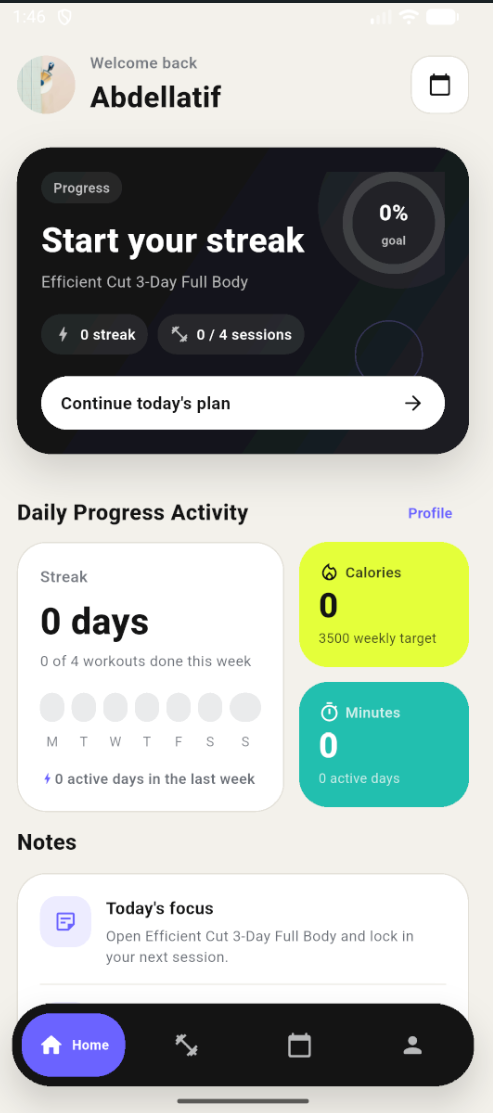
Build your split, track the session, and review your week from one clean home screen.

Download on theApp Store
Coming soon toGoogle Play
Build your split Days, exercises, reps, rest.
Stay in rhythm Track sets and keep the timer running.
See the week Streak, targets, recent workouts.
Build your split once
Log sets without breaking pace
Review progress at a glance
One clean home screen

Built around three moments

Plan. Lift. Review. The loop is short by design.

Plan

Build days in minutes.

Pick exercises, sets, reps, and rest. Create the routine once.

Train

Track without breaking pace.

Log the set. Watch the timer. Move on.

Review

Know your week fast.

Streak, target, and recent sessions in one glance.

What the app handles

Four jobs. No clutter.

Create workout plans

Build routines with clear days, exercises, reps, and rest.

Run active workouts

Move through the session, log sets, and keep pace with the timer.

Track weekly momentum

See recent workouts, streak progress, and weekly targets at a glance.

Keep control of your account

Profile, goals, password, and account controls stay in one place.

Write it down. See the change.

Training notes and weekly photo check-ins — your progress, documented.

Training notes

Capture soreness, form cues, energy — anything worth remembering.

Apr 23, 2025

Deadlifts felt solid today. Kept lower back neutral on all 5 sets — cue "push the floor away" is clicking.

Apr 20, 2025

Upper body day. Right shoulder slightly tight on overhead press. Drop to 3 sets next time and see how it feels.

Apr 17, 2025

Legs. High energy. Added 5 kg to squats — felt controlled throughout.

Weekly check-in

Progress photo, bodyweight, and a short note — once a week.

Week 3
This week
Bodyweight 83.4 kg
Change −1.2 kg
Week 4

Feeling leaner through the midsection. Sleep has been good this week, energy in sessions is up.

MCP Integration

Talk to your training data.
From any AI assistant.

Trainerrr ships a built-in MCP server. Connect Claude, or any MCP-compatible AI, and control the entire app through conversation — log workouts, build plans, check progress, set goals.

Claude — Trainerrr connected trainerrr-mcp
Log yesterday's upper body: bench press 4×8 at 80 kg, cable rows 3×10 at 55 kg, shoulder press 3×10 at 40 kg.
log_workout
Logged. Upper Body — yesterday, 10 sets across 3 exercises. It's in your Trainerrr history now.
Build me a 4-day push/pull split for intermediate level. Label the days clearly.
search_exercises · create_workout_plan
Done. Push / Pull Split — Intermediate is live in your Plans tab. 4 days: Push A, Pull A, Push B, Pull B — 4–5 exercises each.
How's my week looking? Am I on track?
list_workout_history · get_user_targets
3 of 4 sessions done — you're on track. 168 min logged this week, calorie target at 61%. One session left to hit your weekly goal.
What you can do
Build plans Generate full workout plans — days, exercises, sets, rest.
Log workouts Describe your session in plain language — AI writes the structured log.
Review progress Ask about streaks, history, weekly targets, and check-in data.
Search exercises Browse the library by muscle group, or create custom exercises.
Add journal notes Save training notes and weekly check-ins through conversation.
Adjust goals Update weekly targets, calorie goals, and steps through natural language.
How to connect
1
Open your AI client Go to Settings → Integrations → MCP Servers in Claude Desktop or any MCP-compatible client.
2
Add the server URL
Server URL https://mcp.trainerrr.xyz/mcp
3
Authenticate with your account Sign in with your Trainerrr credentials via OAuth — your data stays private and scoped to your account.

Your AI builds the plan.
The app keeps you to it.

Use any AI — Claude, ChatGPT, Gemini — to design your perfect training split via MCP. The app takes it from there, reminding you what's planned each day and guiding you through every session.

01

Tell your AI what you want

Describe your goals, schedule, and experience level. Your AI builds a custom plan and sends it straight to Trainerrr via MCP.

02

The app reminds you what's next

Open the app and your planned session is already waiting — the right day, the right exercises, ready to start.

03

Log it, review it, repeat

Track the session as you go. Your AI can read back your history, adjust the plan, and keep the momentum building week over week.

Trainerrr

Keep your training simple enough to repeat.

Clear plan. Focused session. Fast weekly review.

Download on theApp Store
Coming soon toGoogle Play